| Type: | Package |
| Title: | Liquid Glass Design Themes for 'shiny' Applications |
| Version: | 0.6.0 |
| Description: | Provides drop-in Liquid Glass themes for 'shiny'. Call glass_theme() and pass the result as theme = to fluidPage(), navbarPage(), or any 'bslib'-aware page function to get translucent surfaces, backdrop blur, and system typography on 'Bootstrap' components. Includes light and dark presets with runtime switching and an OS-following 'auto' mode, an iOS-style intensity control from Ultra Clear to Tinted, optional persistence of the look, named wallpaper scenes, helpers to match 'ggplot2', 'plotly', 'gt', and 'DT' output to the glass pack, a flatten mode for print and screenshots, and documented CSS tokens. |
| License: | GPL-3 |
| URL: | https://ericrayanderson.github.io/shinyglass/, https://github.com/ericrayanderson/shinyglass |
| BugReports: | https://github.com/ericrayanderson/shinyglass/issues |
| Encoding: | UTF-8 |
| Language: | en-US |
| VignetteBuilder: | knitr |
| Imports: | bslib (≥ 0.5.0), htmltools (≥ 0.5.0), sass (≥ 0.4.0), shiny (≥ 1.5.0) |
| Suggests: | DT, ggplot2, gt, knitr, plotly, rmarkdown, coro, ellmer (≥ 0.5.0), shinychat (≥ 0.5.0), shinyreact, testthat (≥ 3.0.0) |
| Config/testthat/edition: | 3 |
| Config/Needs/website: | pkgdown |
| Config/roxygen2/markdown: | TRUE |
| Config/roxygen2/version: | 8.1.1 |
| NeedsCompilation: | no |
| Packaged: | 2026-11-01 23:51:21 UTC; box |
| Author: | Eric Anderson [aut, cre, cph], The Inter Project Authors [ctb, cph] (Inter font in inst/fonts/inter, SIL Open Font License 1.1) |
| Maintainer: | Eric Anderson <eric.ray.anderson@gmail.com> |
| Repository: | CRAN |
| Date/Publication: | 2026-11-02 00:10:02 UTC |
Liquid Glass Design Themes for 'shiny' Applications
Description
Drop-in Liquid Glass themes for shiny.
This is the installed usage page. help("shinyglass") and
help("shinyglass-package") open it (?shinyglass is the same page).
vignette("shinyglass") is this recipe, and
browseVignettes("shinyglass") lists that vignette.
Details
Pass glass_theme() to theme on a bslib page or fluidPage(), or
start from glass_page(). Intensity runs from 0 (Ultra Clear) to 1
(Tinted). The default is 0.5.
Minimal app
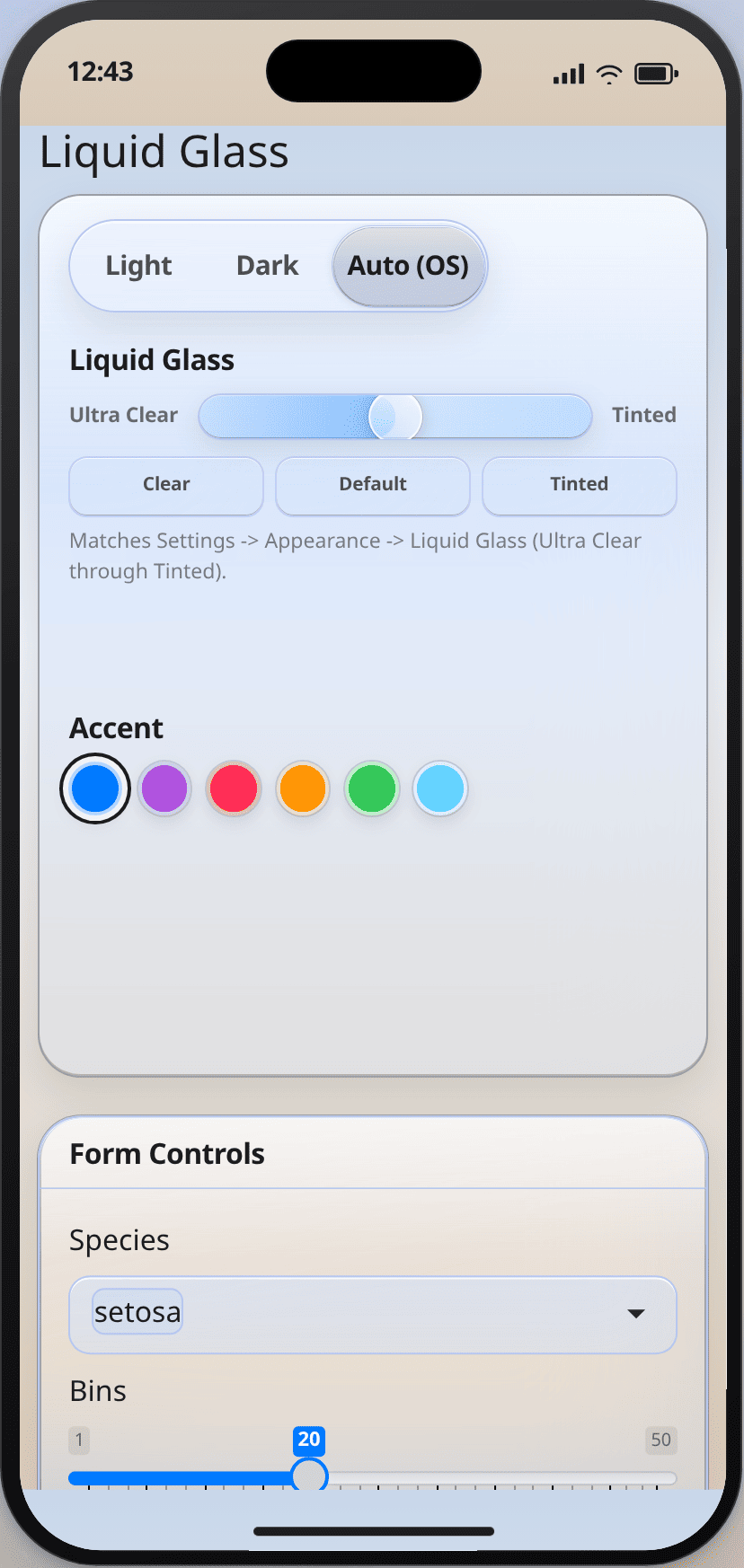
glass_page() includes Light / Dark / Auto, the intensity slider, and
accent wells, and it turns persistence on. Call observe_glass() in the
server. Keep plot backgrounds transparent and take ink from
glass_plot_colors().
library(shiny)
library(shinyglass)

ui <- glass_page(
  title = "Hello, glass",
  sliderInput("n", "Bars", 5, 30, 15),
  plotOutput("plot")
)

server <- function(input, output, session) {
  observe_glass(input, session)
  output$plot <- renderPlot({
    pal <- glass_plot_colors(input = input)
    barplot(seq_len(input$n), col = pal$fill, border = NA, col.axis = pal$ink)
  }, bg = "transparent")
}

shinyApp(ui, server)
Mobile support
The same app works on desktop and phone with no extra code. Controls are sized for touch, sidebars and popovers open and close as expected on a phone, and pages do not scroll sideways. On a desktop, each live demo has a Phone view button that shows it in a phone-sized frame.
Existing app
Keep the page function you already use. Pass the theme, add the controls,
and observe them. page_sidebar(), page_fluid(), page_navbar(),
page_fillable(), and navbarPage() all take theme.
fluidPage(theme = glass_theme()) works too.
library(shiny)
library(bslib)
library(shinyglass)

ui <- page_sidebar(
  title = "Existing app",
  theme = glass_theme(preset = "auto", intensity = 0.5),
  sidebar = sidebar(
    glass_theme_toggle(),
    glass_intensity_slider()
  ),
  "Main column"
)

server <- function(input, output, session) {
  observe_glass(input, session)
}

shinyApp(ui, server)
fluidPage() and navbarPage() take the same theme:
ui <- fluidPage(
  theme = glass_theme(preset = "auto", intensity = 0.5),
  glass_theme_toggle(),
  glass_intensity_slider(),
  plotOutput("plot")
)
The server is unchanged: observe_glass(input, session).
glass_theme() does not remember choices (persist = FALSE).
glass_page() does (persist = TRUE).
Key options
| Argument | Default | Allowed |
preset | "light" on glass_theme(), "auto" on glass_page() | "light", "dark", "auto" |
intensity | 0.5 | number from 0 (Ultra Clear) to 1 (Tinted) |
primary | "#007AFF" | hex, rgb(), or a name from glass_system_colors() |
material | "regular" | "regular". "clear" is deprecated |
plot_surface | "clear" | "clear", "opaque" |
scene | "default" ("tahoe" on glass_page()) | names(glass_scenes()) |
persist | FALSE (TRUE on glass_page()) | TRUE or FALSE |
refraction, morph, press, scroll_edge, minimize_tabs | TRUE | TRUE or FALSE |
icon_style | "clear" | "clear", "color", "all" |
floating_sidebar | FALSE | TRUE or FALSE |
specular | TRUE | TRUE or FALSE |
pointer_specular, nav_pill, motion | TRUE | TRUE or FALSE |
style | "default" | "default", "clear", "tinted" |
font | "matched" | "matched", "system"
|
update_glass_theme() changes these in a running app. NULL leaves that
setting alone. When the user picks Auto, input$glass_preset stays
"auto". Plot ink must use glass_resolved_preset(), which is "light"
or "dark".
Migrating to 0.5.0
vignette("migrating") is the full note.
Default intensity moved from
0.45to0.5.-
material = "clear"is deprecated. Delete it and passintensity. Whenintensityis omitted, clear maps to0.12and warns. To keep that look, writeintensity = 0.12. Specular highlights no longer follow the pointer.
specular = FALSEhides them.-
refraction,morph,press,scroll_edge,minimize_tabs, andicon_style = "clear"are on by default.floating_sidebarstays off. Page functions and click targets stay the same.
Pitfalls
App CSS that sets panel or text colors fights the theme. Use
--glass-*tokens fromglass_css_tokens(), orglass_theme(tokens = list(blur = "28px")).Plots and tables are transparent. Pass
bg = "transparent"torenderPlot(), or setplot_surface = "opaque"when the wallpaper makes the graphic hard to read. Color ink withglass_plot_colors().-
observe_glass()only watchesglass_toggle,glass_intensity, andglass_accent. A custom id needs the matchingobserve_glass_*()helper. For shinyreact, name the theme:
glass_page_react(theme = glass_theme()). An unnamed theme drops the CSS.page_react_html()has nothemeargument; passextra_deps = glass_theme_dependencies().shinychat:
page_chat(theme = glass_theme()). bsliboffcanvas()uses the same material.Reduced transparency, increased contrast, and forced colors override the glass.
glass_flatten()or?glass_flatten=1removes blur for screenshots and PDF.
vignette("shinyglass") is this same recipe, installed with the package.
Author(s)
Maintainer: Eric Anderson eric.ray.anderson@gmail.com [copyright holder]
Authors:
Eric Anderson eric.ray.anderson@gmail.com [copyright holder]
See Also
glass_page(), glass_theme(), update_glass_theme(),
observe_glass(), glass_intensity_slider(), glass_plot_colors(),
glass_page_react(), glass_flatten()
Examples
inherits(glass_theme(preset = "auto", intensity = 0.5), "bs_theme")
DT options that pair with glass plot surfaces
Description
Host CSS already skins DataTables (pagination, ink, opaque/clear panels). This helper is optional: it keeps tables inside glass cards with wrapping headers and in-card horizontal scroll, the same contract used by the dashboard demo.
Usage
dt_options_glass(..., page_length = 8, scroll_x = FALSE)
Arguments
... |
Named DT |
page_length |
Rows per page. |
scroll_x |
Enable DataTables |
Value
A named list for DT::datatable(options = ).
See Also
gt_theme_glass(), glass_theme()
Other glass plots:
glass_plot_colors(),
gt_theme_glass(),
plotly_glass(),
theme_glass()
Examples
dt_options_glass(page_length = 8)
dt_options_glass(searching = FALSE, scroll_x = TRUE)
Accent color wells
Description
Compact row of color wells. The client applies window.shinyglass.setPrimary()
immediately; the value is also a Shiny input (input[[inputId]]) so the
server can persist or restyle plots. Pair with observe_glass_accent() if
you also want update_glass_theme() to echo the change.
Usage
glass_accent_input(
  inputId = "glass_accent",
  label = "Accent",
  selected = "blue",
  colors = glass_system_colors()
)
Arguments
inputId |
The |
label |
Display label (or |
selected |
Initially selected well: a name in |
colors |
Named character vector of hex colors. Defaults to
|
Value
A Shiny UI tag hierarchy.
See Also
observe_glass_accent(), glass_system_colors(), update_glass_theme()
Other glass controls:
glass_intensity_slider(),
glass_plot_surface_input(),
glass_preset_input(),
glass_resolved_preset(),
glass_scene_input(),
glass_system_colors(),
glass_theme_toggle(),
observe_glass(),
observe_glass_accent(),
observe_glass_intensity(),
observe_glass_plot_surface(),
observe_glass_preset_input(),
observe_glass_scene(),
observe_glass_theme_toggle()
Examples
wells <- glass_accent_input()
wells
Override glass CSS tokens on a theme
Description
Injects :root { --glass-*: ... } without forking SCSS. Accepts public
token names from glass_css_tokens() ("blur"), CSS names
("--glass-blur"), or glass-blur. Unknown names that already start
with -- are passed through; others must be in the catalog.
Usage
glass_add_tokens(theme, tokens = list(), ...)
Arguments
theme |
A |
tokens |
Named list or character vector of CSS values. |
... |
Additional |
Value
The theme, with an extra HTML dependency.
See Also
glass_css_tokens(), glass_token_pack(), glass_theme()
Other glass tokens:
glass_css_tokens(),
glass_scenes(),
glass_token_pack()
Examples
th <- glass_theme()
th <- glass_add_tokens(th, list(blur = "28px", radius = "1.25rem"))
Stable Liquid Glass CSS tokens
Description
Catalog of public --glass-* custom properties. Override them with
glass_add_tokens() or glass_theme() tokens= without forking
inst/scss/glass.scss. Light/dark packs already ship as dual
[data-glass-preset] rules; prefer these variables over Sass $glass-*.
Usage
glass_css_tokens()
Details
Contrast floor (wallpaper / scenes): body ink is #1d1d1f (light) or
#f5f5f7 (dark). User wallpapers are blurred and washed
(--glass-wallpaper-wash) so text sits on glass or a dimmed photo, not
raw imagery. Overlay menus use --glass-menu-bg (~86% light / ~88% dark).
Target 4.5:1 for body text and 3:1 for large UI chrome.
Value
A data frame with token, css_var, category, and
description.
See Also
glass_add_tokens(), glass_token_pack(), glass_theme()
Other glass tokens:
glass_add_tokens(),
glass_scenes(),
glass_token_pack()
Examples
head(glass_css_tokens())
glass_css_tokens()$css_var
Flatten glass for print, PDF, and screenshots
Description
Neutralizes backdrop blur and translucent fills so chromote, pagedown,
print-to-PDF, static HTML, and shareable shots stay readable. The live
page can enter or leave flatten without a reload.
Usage
glass_flatten(session, on = TRUE)
Arguments
session |
A Shiny session object. |
on |
|
Details
Ways to enter flatten:
-
glass_theme()flatten = TRUE(first paint) -
glass_flatten()/update_glass_theme()flatten = TRUE(live) -
window.shinyglass.setFlatten(true)(or.enterFlatten()/.exitFlatten()) Query string
?glass_flatten=1(handy for chromote / visual QA)-
@media print(automatic for browser print / PDF)
Value
session, invisibly.
See Also
update_glass_theme(), glass_theme()
Other glass themes:
glass_page(),
glass_page_react(),
glass_theme(),
glass_theme_dependencies(),
update_glass_theme()
Examples
if (interactive()) {
  library(shiny)
  library(shinyglass)

  ui <- fluidPage(
    theme = glass_theme(),
    actionButton("flat", "Flatten for capture"),
    actionButton("live", "Live glass")
  )
  server <- function(input, output, session) {
    observeEvent(input$flat, glass_flatten(session, TRUE))
    observeEvent(input$live, glass_flatten(session, FALSE))
  }
  shinyApp(ui, server)
}
Liquid Glass intensity slider (iOS 27-style)
Description
UI control matching iOS 27 Settings -> Appearance -> Liquid Glass: a
continuous slider from Ultra Clear (0) to Tinted (1) that
live-updates the glass material without a page reload. Browsers cannot read
the OS Appearance slider, so this in-app control is the supported way to
match that look.
Usage
glass_intensity_slider(
  inputId = "glass_intensity",
  label = "Liquid Glass",
  value = NULL,
  min = 0,
  max = 1,
  step = 0.01,
  min_label = "Ultra Clear",
  max_label = "Tinted",
  preview = TRUE,
  width = NULL
)
Arguments
inputId |
The |
label |
Display label for the control (or |
value |
Initial intensity in |
min, max, step |
Range for the underlying range input. Defaults cover
the full Ultra Clear -> Tinted spectrum. Bounds must be finite, within
|
min_label, max_label |
End-cap captions (iOS uses "Ultra Clear" / "Tinted"). |
preview |
Show three mini glass chips as a live material sample. |
width |
CSS width (passed to |
Details
The client applies changes immediately via window.shinyglass.setIntensity().
The value is also a normal Shiny input (input[[inputId]]) so the server can
react or persist it. Pair with glass_theme() intensity= for the starting
value, and optionally observe_glass_intensity() to push server-driven
updates through update_glass_theme().
Value
A Shiny UI tag hierarchy.
See Also
observe_glass_intensity(), glass_theme(), update_glass_theme()
Other glass controls:
glass_accent_input(),
glass_plot_surface_input(),
glass_preset_input(),
glass_resolved_preset(),
glass_scene_input(),
glass_system_colors(),
glass_theme_toggle(),
observe_glass(),
observe_glass_accent(),
observe_glass_intensity(),
observe_glass_plot_surface(),
observe_glass_preset_input(),
observe_glass_scene(),
observe_glass_theme_toggle()
Examples
if (interactive()) {
  library(shiny)
  library(shinyglass)

  ui <- fluidPage(
    theme = glass_theme(intensity = 0.35),
    glass_theme_toggle(),
    glass_intensity_slider("glass_intensity"),
    plotOutput("p")
  )

  server <- function(input, output, session) {
    observe_glass_theme_toggle(input, session)
    # optional: mirror slider -> server message (client already updates live)
    observe_glass_intensity(input, session, "glass_intensity")
    output$p <- renderPlot(plot(rnorm(100), rnorm(100), pch = 16, col = "#007AFF"))
  }

  shinyApp(ui, server)
}
One-call glass page
Description
Wraps shiny::fluidPage() with glass_theme() and, by default, the Light /
Dark / Auto toggle, intensity slider, and accent wells. Pair with
observe_glass() in the server function.
Usage
glass_page(
  ...,
  title = NULL,
  preset = "auto",
  intensity = 0.5,
  persist = TRUE,
  scene = "tahoe",
  wallpaper = NULL,
  plot_surface = "clear",
  flatten = FALSE,
  refraction = TRUE,
  morph = TRUE,
  press = TRUE,
  scroll_edge = TRUE,
  minimize_tabs = TRUE,
  icon_style = c("clear", "color", "all"),
  floating_sidebar = FALSE,
  controls = TRUE,
  theme = NULL
)
Arguments
... |
UI elements passed to |
title |
Optional page title ( |
preset, intensity, persist, scene, wallpaper, plot_surface, flatten, refraction, morph, press, scroll_edge, minimize_tabs, icon_style, floating_sidebar |
Forwarded to |
controls |
|
theme |
Optional pre-built |
Value
A Shiny UI tag list suitable as shinyApp(ui = ...).
See Also
shinyglass, glass_theme(), observe_glass(),
glass_intensity_slider()
Other glass themes:
glass_flatten(),
glass_page_react(),
glass_theme(),
glass_theme_dependencies(),
update_glass_theme()
Examples
if (interactive()) {
  library(shiny)
  library(shinyglass)

  ui <- glass_page(
    title = "Hello, glass",
    plotOutput("plot")
  )
  server <- function(input, output, session) {
    observe_glass(input, session)
    output$plot <- renderPlot(plot(1:10), bg = "transparent")
  }
  shinyApp(ui, server)
}
Liquid Glass page for a shinyreact client
Description
shinyreact::page_react() emits no body HTML and, unless you pass a
theme, serves no Bootstrap. glass_theme() is a bslib::bs_theme(),
so the supported call is page_react(theme = glass_theme()). Passing the
theme as an unnamed argument does not set that parameter: shinyreact then
suppresses the Bootstrap dependency, which is also where the compiled glass
CSS lives, and the page keeps the JS without the look.
Usage
glass_page_react(..., theme = NULL)
Arguments
... |
Passed to |
theme |
A |
Details
glass_page_react() is that call, plus glass_react_dependency(). The
React client still owns the DOM. Build it from GlassPage, GlassSidebar,
GlassSurface / GlassCard, and GlassButton on window.shinyglass.
useGlassTheme() tracks the live mode (light / dark / auto), the
resolved preset, scene, material, and intensity, plus refraction, morph,
press, scroll edge, tab minimize, icon style, and floating sidebar, and
whether Reduce Transparency, Increase Contrast, reduced motion, or forced
colors are active. Its setters call window.shinyglass.setPreset() and
the other mutators, including setRefraction() and setIconStyle().
GlassIntensitySlider runs from Ultra Clear to Tinted and defaults to
0.5. setMaterial("clear") is deprecated and maps to intensity 0.12.
Wallpaper, type, and --glass-* tokens apply to the document. Those
component classes are what pick up Liquid Glass. Do not set panel or text
colors in the client's own CSS.
Shadow roots do not see document class rules. --glass-* custom properties
inherit. Call window.shinyglass.adoptShadow(shadowRoot) from the
component that created the root to inject a .glass-surface rule.
For shinyreact::page_react_html(), pass
glass_theme_dependencies() as extra_deps. That helper does not need
shinyreact. It includes the React module.
Value
UI suitable for shinyApp(ui = ...).
See Also
glass_theme(), glass_theme_dependencies(),
glass_react_dependency()
Other glass themes:
glass_flatten(),
glass_page(),
glass_theme(),
glass_theme_dependencies(),
update_glass_theme()
Other shinyreact glass:
glass_react_dependency(),
glass_theme_dependencies()
Examples
if (interactive() && requireNamespace("shinyreact", quietly = TRUE)) {
  # App directory must contain www/ui.js. See the shipped example:
  # system.file("examples/shinyreact-glass", package = "shinyglass")
  ui <- glass_page_react(theme = glass_theme(preset = "auto", scene = "tahoe"))
}
Ink and grid colors for the current glass appearance
Description
Returns the ink, grid, fill, and paper colors for a light or dark glass
page. Pass surface = "opaque" when a chart must sit on a near-solid panel.
Usage
glass_plot_colors(preset = NULL, input = NULL, surface = c("clear", "opaque"))
Arguments
preset |
|
input |
Optional Shiny |
surface |
|
Value
A list with preset, ink, grid, fill, paper, and surface.
See Also
theme_glass(), plotly_glass(), glass_resolved_preset()
Other glass plots:
dt_options_glass(),
gt_theme_glass(),
plotly_glass(),
theme_glass()
Examples
glass_plot_colors("light")
glass_plot_colors("dark", surface = "opaque")$paper
Plot / table surface select
Description
Drop-in shiny::selectInput() that applies
window.shinyglass.setPlotSurface() immediately. Pair with
observe_glass_plot_surface() so the server stays in sync.
Usage
glass_plot_surface_input(
  inputId = "plot_surface",
  label = "Plot / table surface",
  selected = c("clear", "opaque"),
  width = NULL
)
Arguments
inputId |
The |
label |
Display label (or |
selected |
|
width |
The width of the input (e.g. |
Value
A shiny::selectInput() tag marked for client bindings.
See Also
observe_glass_plot_surface(), glass_theme()
Other glass controls:
glass_accent_input(),
glass_intensity_slider(),
glass_preset_input(),
glass_resolved_preset(),
glass_scene_input(),
glass_system_colors(),
glass_theme_toggle(),
observe_glass(),
observe_glass_accent(),
observe_glass_intensity(),
observe_glass_plot_surface(),
observe_glass_preset_input(),
observe_glass_scene(),
observe_glass_theme_toggle()
Examples
glass_plot_surface_input(selected = "opaque")
Light / dark / auto preset select input
Description
Drop-in shiny::selectInput() for the glass theme preset. The client applies
the change immediately via window.shinyglass.setPreset() (marked with
data-glass-preset-input), so Light/Dark/Auto works even when custom
messages are delayed or rewritten (e.g. on some shinyapps.io hosts). Pair
with observe_glass_preset_input() so the server stays in sync.
Usage
glass_preset_input(
  inputId = "glass_preset",
  label = "Theme preset",
  selected = c("auto", "light", "dark"),
  choices = c(Light = "light", Dark = "dark", `Auto (OS)` = "auto"),
  width = NULL
)
Arguments
inputId |
The |
label |
Display label for the control (or |
selected |
Initially selected mode ( |
choices |
Named character vector of choices. Defaults to Light / Dark /
Auto (OS). Names are labels; values must be |
width |
The width of the input (e.g. |
Value
A shiny::selectInput() tag (with glass client bindings).
See Also
observe_glass_preset_input(), glass_theme_toggle(),
update_glass_theme()
Other glass controls:
glass_accent_input(),
glass_intensity_slider(),
glass_plot_surface_input(),
glass_resolved_preset(),
glass_scene_input(),
glass_system_colors(),
glass_theme_toggle(),
observe_glass(),
observe_glass_accent(),
observe_glass_intensity(),
observe_glass_plot_surface(),
observe_glass_preset_input(),
observe_glass_scene(),
observe_glass_theme_toggle()
Examples
glass_preset_input(selected = "light")
HTML dependency for the shinyreact components
Description
shinyreact::page_react() serves www/ui.js as an ES module and exposes
one React on window.shinyreact. glass_react_dependency() is the matching
module, inst/js/shinyglass-react.js. It registers useGlassTheme,
GlassPage, GlassMain, GlassSidebar, GlassSurface, GlassCard,
GlassStack, GlassButton, GlassTitle, GlassMuted, GlassRange,
and GlassIntensitySlider on window.shinyglass and as named exports.
useGlassTheme() also reports reducedTransparency, increasedContrast,
forcedColors, reducedMotion, refraction, morph, press,
scrollEdge, minimizeTabs, iconStyle, and floatingSidebar.
Usage
glass_react_dependency()
Details
The module does not import React and does not bundle a second copy.
Components call window.shinyreact.React when they render. Styling is
class names (.glass-page, .glass-sidebar, .glass-surface,
.glass-button-primary, and so on). Colors, blur, and radius come from
the --glass-* custom properties already defined by glass_theme(), so
the React pieces stay in sync with the R and Python themes.
glass_page_react() bundles this dependency into the theme, which
shiny::bootstrapPage() emits before the app module. www/ui.js can read
window.shinyglass at top level. glass_theme_dependencies() appends the
same dependency for shinyreact::page_react_html(). A plain
glass_theme() does not load the module, so classic Shiny pages are
unchanged.
An npm package is intentionally not the distribution. shinyreact's default
app has no build step, and htmltools serves this file at a versioned URL,
so a hardcoded import in www/ui.js would break on every package
version. The global matches how shinyreact itself is consumed.
Value
An htmltools::htmlDependency().
See Also
glass_page_react(), glass_theme_dependencies()
Other shinyreact glass:
glass_page_react(),
glass_theme_dependencies()
Examples
dep <- glass_react_dependency()
dep$name
Resolved light or dark appearance
Description
When the user picks Auto, input$preset stays "auto" so checks like
identical(input$preset, "dark") stay FALSE and plots keep light ink on a
dark page. The client publishes the resolved appearance as
input$glass_resolved_preset ("light" or "dark").
Usage
glass_resolved_preset(input, default = c("light", "dark"))
Arguments
input |
The server |
default |
Fallback if the client has not reported yet ( |
Value
"light" or "dark".
See Also
glass_plot_colors(), glass_theme()
Other glass controls:
glass_accent_input(),
glass_intensity_slider(),
glass_plot_surface_input(),
glass_preset_input(),
glass_scene_input(),
glass_system_colors(),
glass_theme_toggle(),
observe_glass(),
observe_glass_accent(),
observe_glass_intensity(),
observe_glass_plot_surface(),
observe_glass_preset_input(),
observe_glass_scene(),
observe_glass_theme_toggle()
Examples
glass_resolved_preset(default = "dark")
Scene picker for wallpaper packs
Description
Drop-in shiny::selectInput() that applies window.shinyglass.setScene()
immediately. Pair with observe_glass_scene() so the server stays in sync.
Usage
glass_scene_input(
  inputId = "glass_scene",
  label = "Wallpaper scene",
  selected = "default",
  choices = glass_scenes(),
  width = NULL
)
Arguments
inputId |
The |
label |
Display label (or |
selected |
Initially selected scene id. |
choices |
Named character vector. Defaults to |
width |
The width of the input (e.g. |
Value
A shiny::selectInput() tag marked for client bindings.
See Also
glass_scenes(), observe_glass_scene(), update_glass_theme()
Other glass controls:
glass_accent_input(),
glass_intensity_slider(),
glass_plot_surface_input(),
glass_preset_input(),
glass_resolved_preset(),
glass_system_colors(),
glass_theme_toggle(),
observe_glass(),
observe_glass_accent(),
observe_glass_intensity(),
observe_glass_plot_surface(),
observe_glass_preset_input(),
observe_glass_scene(),
observe_glass_theme_toggle()
Examples
glass_scene_input(selected = "harbor")
Named wallpaper scenes
Description
Curated page backgrounds for glass_theme() scene=. Each name ships
light and dark gradient/orb packs. Pair with wallpaper= for a user photo;
the photo is blurred and washed so body ink stays above the contrast floor
documented in glass_css_tokens().
Usage
glass_scenes()
Value
A named character vector: names are scene ids, values are labels.
See Also
glass_scene_input(), glass_theme()
Other glass tokens:
glass_add_tokens(),
glass_css_tokens(),
glass_token_pack()
Examples
names(glass_scenes())
glass_scenes()[["aurora"]]
iOS system accent colors
Description
Named hex colors matching iOS Settings wells: blue, purple, pink, orange, green, and teal.
Usage
glass_system_colors()
Value
A named character vector of #RRGGBB colors.
See Also
Other glass controls:
glass_accent_input(),
glass_intensity_slider(),
glass_plot_surface_input(),
glass_preset_input(),
glass_resolved_preset(),
glass_scene_input(),
glass_theme_toggle(),
observe_glass(),
observe_glass_accent(),
observe_glass_intensity(),
observe_glass_plot_surface(),
observe_glass_preset_input(),
observe_glass_scene(),
observe_glass_theme_toggle()
Examples
glass_system_colors()
glass_system_colors()[["blue"]]
Liquid Glass theme for 'shiny'
Description
Create a bslib::bs_theme() styled with a Liquid Glass look: translucent
surfaces, backdrop blur, soft depth, and system typography. Pass the result
to theme = on fluidPage(), navbarPage(), bslib::page_sidebar(), or
any other page function that accepts a bslib theme. For a
shinyreact client, use
glass_page_react() so the theme is passed as theme (an unnamed theme
is not enough: shinyreact would suppress Bootstrap and drop this CSS).
Usage
glass_theme(
  preset = c("light", "dark", "auto"),
  primary = "#007AFF",
  blur = 36,
  saturation = 200,
  radius = "1.5rem",
  material = c("regular", "clear"),
  plot_surface = c("clear", "opaque"),
  intensity = 0.5,
  tint = TRUE,
  specular = TRUE,
  nav_morph = TRUE,
  ambient_motion = TRUE,
  persist = FALSE,
  scene = c("default", "tahoe", "dusk", "mesh", "aurora", "harbor", "grove"),
  wallpaper = NULL,
  flatten = FALSE,
  tokens = NULL,
  refraction = TRUE,
  morph = TRUE,
  press = TRUE,
  scroll_edge = TRUE,
  minimize_tabs = TRUE,
  icon_style = c("clear", "color", "all"),
  floating_sidebar = FALSE,
  pointer_specular = TRUE,
  nav_pill = TRUE,
  style = c("default", "clear", "tinted"),
  motion = TRUE,
  font = c("matched", "system"),
  ...
)
Arguments
preset |
|
primary |
Accent color for buttons, links, and focus rings.
Defaults to system blue ( |
blur |
Backdrop blur radius in pixels. Default |
saturation |
Backdrop saturation percentage. Default |
radius |
Default border radius for glass surfaces (CSS length).
Prefer larger concentric radii (default |
material |
|
plot_surface |
|
intensity |
Liquid Glass intensity from |
tint |
Logical. Content-aware ambient tint from plots and images.
Default |
specular |
Top and bottom specular highlights. |
nav_morph |
Logical. Compact navbar on scroll down; expand on scroll
up. Default |
ambient_motion |
Logical. Animate the decorative ambient sheen.
Default |
persist |
Remember preset, intensity, accent, material, plot surface,
and scene in |
scene |
Wallpaper scene id from |
wallpaper |
Optional image URL painted as a frosted photo behind the
glass (https, data URI, or site-relative path). Photos are blurred and
washed so body ink stays above the contrast floor (see |
flatten |
|
tokens |
Named list of public CSS token overrides (see
|
refraction |
|
morph |
|
press |
|
scroll_edge |
|
minimize_tabs |
|
icon_style |
|
floating_sidebar |
|
pointer_specular |
|
nav_pill |
|
style |
|
motion |
|
font |
|
... |
Additional arguments forwarded to |
Details
Light and dark surface tokens are compiled into dual CSS custom-property
packs. Switching preset at runtime (via update_glass_theme() or
preset = "auto") updates document.documentElement.dataset.glassPreset
without recompiling Sass or reloading the page. Accent color can also be
updated live with update_glass_theme() primary= (CSS variables).
Value
A bslib::bs_theme() object suitable for 'shiny' page functions.
See Also
shinyglass, glass_page(), update_glass_theme(),
glass_intensity_slider(), glass_flatten()
Other glass themes:
glass_flatten(),
glass_page(),
glass_page_react(),
glass_theme_dependencies(),
update_glass_theme()
Examples
theme <- glass_theme()
opaque <- glass_theme(
  plot_surface = "opaque",
  scene = "aurora",
  tokens = list(blur = "28px")
)

if (interactive()) {
  library(shiny)

  ui <- fluidPage(
    theme = glass_theme(preset = "auto"),
    titlePanel("Liquid Glass"),
    glass_theme_toggle(),
    selectInput("color", "Color", c("Blue", "Purple", "Orange")),
    plotOutput("plot")
  )

  server <- function(input, output, session) {
    # Client onclick already switches; keep session in sync:
    observe_glass_theme_toggle(input, session)
  }

  shinyApp(ui, server)
}
HTML dependencies for a glass theme
Description
Turns glass_theme() into the htmltools::htmlDependency() list that
bslib::bs_theme_dependencies() would attach on a Bootstrap page, and
appends glass_react_dependency(). Use this when the page has no theme
argument, in particular
shinyreact::page_react_html(extra_deps = glass_theme_dependencies(...)).
Usage
glass_theme_dependencies(theme = glass_theme())
Arguments
theme |
A |
Details
glass_page_react() is the easier entry for shinyreact::page_react().
Value
A list of htmltools::htmlDependency() objects (Bootstrap 5, the
compiled glass rules, the preset head script, shiny-glass.js, and
shinyglass-react.js).
See Also
glass_page_react(), glass_theme(), glass_react_dependency()
Other glass themes:
glass_flatten(),
glass_page(),
glass_page_react(),
glass_theme(),
update_glass_theme()
Other shinyreact glass:
glass_page_react(),
glass_react_dependency()
Examples
deps <- glass_theme_dependencies(glass_theme(preset = "dark"))
Light / dark / auto theme toggle buttons
Description
Drop-in button group for switching the glass preset. Each button sets the
preset on the client immediately (window.shinyglass.setPreset) and also
has a 'shiny' input id so observe_glass_theme_toggle() can keep the server
in sync (important on hosts that rewrite custom messages).
Usage
glass_theme_toggle(
  inputId = "glass_toggle",
  selected = c("auto", "light", "dark"),
  labels = c(light = "Light", dark = "Dark", auto = "Auto (OS)"),
  class = "glass-theme-toggle"
)
Arguments
inputId |
Base id. Buttons are |
selected |
Initially highlighted mode ( |
labels |
Named character vector for button labels. Names must be
|
class |
Extra CSS classes for the wrapper. |
Value
An htmltools::tag() button group.
See Also
observe_glass_theme_toggle(), update_glass_theme(),
glass_preset_input()
Other glass controls:
glass_accent_input(),
glass_intensity_slider(),
glass_plot_surface_input(),
glass_preset_input(),
glass_resolved_preset(),
glass_scene_input(),
glass_system_colors(),
observe_glass(),
observe_glass_accent(),
observe_glass_intensity(),
observe_glass_plot_surface(),
observe_glass_preset_input(),
observe_glass_scene(),
observe_glass_theme_toggle()
Examples
glass_theme_toggle(selected = "dark")
Default CSS variable pack for a preset
Description
Values that glass_theme() compiles into [data-glass-preset]. Use as a
starting point for glass_add_tokens() overrides.
Usage
glass_token_pack(preset = c("light", "dark"))
Arguments
preset |
|
Value
A named list of CSS custom properties (names include --).
See Also
glass_css_tokens(), glass_add_tokens()
Other glass tokens:
glass_add_tokens(),
glass_css_tokens(),
glass_scenes()
Examples
names(glass_token_pack("light"))
glass_token_pack("dark")[["--glass-body-color"]]
gt table options that match glass chrome
Description
Transparent table chrome so glass cards show through. Requires gt.
Usage
gt_theme_glass(
  data,
  preset = NULL,
  input = NULL,
  surface = c("clear", "opaque")
)
Arguments
data |
A |
preset, input, surface |
See |
Value
A gt table.
See Also
dt_options_glass(), glass_plot_colors()
Other glass plots:
dt_options_glass(),
glass_plot_colors(),
plotly_glass(),
theme_glass()
Examples
if (requireNamespace("gt", quietly = TRUE)) {
  gt_theme_glass(head(mtcars), preset = "light")
}
Observe every built-in glass control
Description
Registers observe_glass_theme_toggle(), observe_glass_intensity(), and
observe_glass_accent() with the default input ids used by glass_page().
Usage
observe_glass(
  input,
  session,
  toggle_id = "glass_toggle",
  intensity_id = "glass_intensity",
  accent_id = "glass_accent"
)
Arguments
input, session |
Shiny server |
toggle_id, intensity_id, accent_id |
Character input ids matching the UI
controls. Defaults |
Value
NULL, invisibly.
See Also
glass_page(), observe_glass_theme_toggle(),
observe_glass_intensity(), observe_glass_accent()
Other glass controls:
glass_accent_input(),
glass_intensity_slider(),
glass_plot_surface_input(),
glass_preset_input(),
glass_resolved_preset(),
glass_scene_input(),
glass_system_colors(),
glass_theme_toggle(),
observe_glass_accent(),
observe_glass_intensity(),
observe_glass_plot_surface(),
observe_glass_preset_input(),
observe_glass_scene(),
observe_glass_theme_toggle()
Examples
if (interactive()) {
  library(shiny)
  ui <- glass_page(title = "Hello, glass", plotOutput("plot"))
  server <- function(input, output, session) {
    observe_glass(input, session)
    output$plot <- renderPlot(plot(1:10), bg = "transparent")
  }
  shinyApp(ui, server)
}
Keep session accent in sync with glass_accent_input()
Description
The wells already update glass live on the client. This observer echoes the
hex through update_glass_theme() so plots and other sessions can follow.
Usage
observe_glass_accent(input, session, inputId = "glass_accent")
Arguments
input |
The server |
session |
A Shiny session object. |
inputId |
Input id of the accent wells. |
Value
An shiny::observeEvent() observer (invisibly).
See Also
glass_accent_input(), update_glass_theme(), observe_glass()
Other glass controls:
glass_accent_input(),
glass_intensity_slider(),
glass_plot_surface_input(),
glass_preset_input(),
glass_resolved_preset(),
glass_scene_input(),
glass_system_colors(),
glass_theme_toggle(),
observe_glass(),
observe_glass_intensity(),
observe_glass_plot_surface(),
observe_glass_preset_input(),
observe_glass_scene(),
observe_glass_theme_toggle()
Examples
if (interactive()) {
  library(shiny)
  ui <- glass_page(title = "Accent")
  server <- function(input, output, session) {
    observe_glass_accent(input, session)
  }
  shinyApp(ui, server)
}
Keep session intensity in sync with glass_intensity_slider()
Description
The slider already updates glass live on the client. This observer optionally
echoes the value through update_glass_theme() so other clients / server
state stay aligned.
Usage
observe_glass_intensity(input, session, inputId = "glass_intensity")
Arguments
input |
The server |
session |
A Shiny session object. |
inputId |
Input id of the intensity slider. |
Value
An shiny::observeEvent() observer (invisibly).
See Also
glass_intensity_slider(), update_glass_theme(), observe_glass()
Other glass controls:
glass_accent_input(),
glass_intensity_slider(),
glass_plot_surface_input(),
glass_preset_input(),
glass_resolved_preset(),
glass_scene_input(),
glass_system_colors(),
glass_theme_toggle(),
observe_glass(),
observe_glass_accent(),
observe_glass_plot_surface(),
observe_glass_preset_input(),
observe_glass_scene(),
observe_glass_theme_toggle()
Examples
if (interactive()) {
  library(shiny)
  ui <- fluidPage(
    theme = glass_theme(intensity = 0.5),
    glass_intensity_slider()
  )
  server <- function(input, output, session) {
    observe_glass_intensity(input, session)
  }
  shinyApp(ui, server)
}
Observe glass_plot_surface_input() on the server
Description
Echoes "clear" or "opaque" through update_glass_theme() after the
client has already applied the surface.
Usage
observe_glass_plot_surface(input, session, inputId = "plot_surface")
Arguments
input, session |
Shiny server |
inputId |
Character. Same id passed to |
Value
An shiny::observeEvent() observer (invisibly).
See Also
glass_plot_surface_input(), update_glass_theme()
Other glass controls:
glass_accent_input(),
glass_intensity_slider(),
glass_plot_surface_input(),
glass_preset_input(),
glass_resolved_preset(),
glass_scene_input(),
glass_system_colors(),
glass_theme_toggle(),
observe_glass(),
observe_glass_accent(),
observe_glass_intensity(),
observe_glass_preset_input(),
observe_glass_scene(),
observe_glass_theme_toggle()
Examples
if (interactive()) {
  library(shiny)
  ui <- glass_page(
    title = "Surface",
    controls = "toggle",
    glass_plot_surface_input()
  )
  server <- function(input, output, session) {
    observe_glass_plot_surface(input, session)
  }
  shinyApp(ui, server)
}
Observe glass_preset_input() on the server
Description
Wires a preset select to update_glass_theme() so session state stays
aligned with the client (the client already applied the preset live).
Usage
observe_glass_preset_input(input, session, inputId = "glass_preset")
Arguments
input |
The server |
session |
The server |
inputId |
Same id passed to |
Value
An shiny::observeEvent() observer (invisibly).
See Also
glass_preset_input(), update_glass_theme()
Other glass controls:
glass_accent_input(),
glass_intensity_slider(),
glass_plot_surface_input(),
glass_preset_input(),
glass_resolved_preset(),
glass_scene_input(),
glass_system_colors(),
glass_theme_toggle(),
observe_glass(),
observe_glass_accent(),
observe_glass_intensity(),
observe_glass_plot_surface(),
observe_glass_scene(),
observe_glass_theme_toggle()
Examples
if (interactive()) {
  library(shiny)
  ui <- fluidPage(
    theme = glass_theme(),
    glass_preset_input()
  )
  server <- function(input, output, session) {
    observe_glass_preset_input(input, session)
  }
  shinyApp(ui, server)
}
Observe glass_scene_input() on the server
Description
Echoes a scene id from glass_scenes() through update_glass_theme()
after the client has already painted it.
Usage
observe_glass_scene(input, session, inputId = "glass_scene")
Arguments
input, session |
Shiny server |
inputId |
Character. Same id passed to |
Value
An shiny::observeEvent() observer (invisibly).
See Also
glass_scene_input(), glass_scenes(), update_glass_theme()
Other glass controls:
glass_accent_input(),
glass_intensity_slider(),
glass_plot_surface_input(),
glass_preset_input(),
glass_resolved_preset(),
glass_scene_input(),
glass_system_colors(),
glass_theme_toggle(),
observe_glass(),
observe_glass_accent(),
observe_glass_intensity(),
observe_glass_plot_surface(),
observe_glass_preset_input(),
observe_glass_theme_toggle()
Examples
if (interactive()) {
  library(shiny)
  ui <- fluidPage(
    theme = glass_theme(),
    glass_scene_input()
  )
  server <- function(input, output, session) {
    observe_glass_scene(input, session)
  }
  shinyApp(ui, server)
}
Observe glass_theme_toggle() buttons on the server
Description
Wires the three toggle inputs to update_glass_theme() so session state
stays aligned with the client (needed on some hosts that rewrite 'shiny'
messaging).
Usage
observe_glass_theme_toggle(input, session, inputId = "glass_toggle")
Arguments
input |
The server |
session |
The server |
inputId |
Same base id passed to |
Value
NULL, invisibly. Called for side effects (registers observers).
See Also
glass_theme_toggle(), update_glass_theme(), observe_glass()
Other glass controls:
glass_accent_input(),
glass_intensity_slider(),
glass_plot_surface_input(),
glass_preset_input(),
glass_resolved_preset(),
glass_scene_input(),
glass_system_colors(),
glass_theme_toggle(),
observe_glass(),
observe_glass_accent(),
observe_glass_intensity(),
observe_glass_plot_surface(),
observe_glass_preset_input(),
observe_glass_scene()
Examples
if (interactive()) {
  library(shiny)
  ui <- fluidPage(
    theme = glass_theme(),
    glass_theme_toggle()
  )
  server <- function(input, output, session) {
    observe_glass_theme_toggle(input, session)
  }
  shinyApp(ui, server)
}
plotly layout that matches glass chrome
Description
Transparent paper/plot backgrounds and ink that follows the resolved
preset. Requires plotly. Call as plotly_glass(p) or
do.call(plotly::layout, c(list(p), plotly_glass())).
Usage
plotly_glass(
  p = NULL,
  preset = NULL,
  input = NULL,
  surface = c("clear", "opaque")
)
Arguments
p |
Optional plotly object. When |
preset, input, surface |
See |
Value
p with layout applied, or a list of layout arguments.
See Also
glass_plot_colors(), theme_glass()
Other glass plots:
dt_options_glass(),
glass_plot_colors(),
gt_theme_glass(),
theme_glass()
Examples
layout <- plotly_glass(preset = "dark")
layout$font$color
ggplot2 theme that follows glass light/dark ink
Description
Transparent panel and plot backgrounds so the page wallpaper shows through
glass cards. Use surface = "opaque" for a near-solid panel when dense
charts must stay readable. Requires ggplot2 (a Suggests dependency).
Usage
theme_glass(
  preset = NULL,
  base_size = 13,
  input = NULL,
  surface = c("clear", "opaque"),
  ...
)
Arguments
preset |
|
base_size |
Base font size passed to |
input |
Optional Shiny |
surface |
|
... |
Additional |
Value
A ggplot2 theme object.
See Also
glass_plot_colors(), plotly_glass(), gt_theme_glass()
Other glass plots:
dt_options_glass(),
glass_plot_colors(),
gt_theme_glass(),
plotly_glass()
Examples
if (requireNamespace("ggplot2", quietly = TRUE)) {
  ggplot2::ggplot(mtcars, ggplot2::aes(wt, mpg)) +
    ggplot2::geom_point() +
    theme_glass("light")
}
Update glass theme options in a running app
Description
Send a message to the browser to change the Liquid Glass preset, accent
color, intensity, or content-tint behavior without reloading the page.
Requires a page that used glass_theme() (so shiny-glass.js is loaded).
Usage
update_glass_theme(
  session,
  preset = NULL,
  tint = NULL,
  primary = NULL,
  intensity = NULL,
  material = NULL,
  plot_surface = NULL,
  ambient_motion = NULL,
  scene = NULL,
  flatten = NULL,
  tokens = NULL,
  refraction = NULL,
  morph = NULL,
  press = NULL,
  scroll_edge = NULL,
  minimize_tabs = NULL,
  icon_style = NULL,
  floating_sidebar = NULL,
  pointer_specular = NULL,
  nav_pill = NULL,
  style = NULL,
  motion = NULL
)
Arguments
session |
A Shiny session object (usually the |
preset |
Optional. |
tint |
Optional logical. Enable or disable content-aware ambient tint. |
primary |
Optional accent color (hex like |
intensity |
Optional numeric in |
material |
Optional |
plot_surface |
Optional |
ambient_motion |
Optional logical. |
scene |
Optional scene id from |
flatten |
Optional logical. See |
tokens |
Optional named list of CSS token overrides (see
|
refraction, morph, press, scroll_edge, minimize_tabs, floating_sidebar |
Optional logicals. See |
icon_style |
Optional |
pointer_specular, nav_pill, motion |
Optional logicals. See
|
style |
Optional |
Details
primary updates CSS variables (--bs-primary, --bs-primary-rgb,
--glass-primary) so buttons, checks, and other accent surfaces follow the
new color. Sass-baked one-off colors may not all switch until a full reload.
intensity updates fill/blur along the Ultra Clear to Tinted spectrum
(see glass_intensity_slider()).
Value
session, invisibly.
See Also
glass_theme(), glass_flatten(), observe_glass()
Other glass themes:
glass_flatten(),
glass_page(),
glass_page_react(),
glass_theme(),
glass_theme_dependencies()
Examples
if (interactive()) {
  library(shiny)
  library(shinyglass)

  ui <- fluidPage(
    theme = glass_theme(),
    glass_theme_toggle(),
    selectInput("accent", "Accent", c("#007AFF", "#AF52DE", "#FF9500"))
  )

  server <- function(input, output, session) {
    observe_glass_theme_toggle(input, session)
    observeEvent(input$accent, {
      update_glass_theme(session, primary = input$accent)
    }, ignoreInit = TRUE)
  }

  shinyApp(ui, server)
}