



countryscales extends scales and ggplot2 by
providing functions to make it easy to display numbers or label axis
text on positional scales in decimal format, as percentages or
currencies using country- or locale-specific style conventions.
See vignette("background", package = "countryscales")
for the story behind why this package exists.
You can install countryscales from CRAN using:
install.packages("countryscales")You can install the development version of countryscales
from GitHub using:
remotes::install_github("trekonom/countryscales")The most common use case for countryscales is to
customize the appearance of axis and legend labels or format numbers
added as labels to a plot using country-specific style conventions.
Here’s an example showing how 1 million USD are formatted in the G20 countries:
library(countryscales)
library(ggplot2)
library(dplyr, warn.conflicts = FALSE)

g20 <- countryscales::g20 |>
  # India is not supported
  filter(iso2c != "IN")

# gapminder's classic per-country colors (Hans Rosling's bubble charts),
# keyed to match g20$country: "Korea, Rep." is gapminder's name for South
# Korea, and gapminder's 142-country palette doesn't cover Russia at all,
# so it gets a manually chosen fallback color
country_colors <- gapminder::country_colors[
  recode(g20$country, "South Korea" = "Korea, Rep.")
] |>
  setNames(g20$country)
country_colors[["Russia"]] <- "#707070"

g20 <- g20 |>
  mutate(
    x = factor(rep(1:2, 9)),
    y = factor(rep(9:1, each = 2)),
    country = if_else(iso2c %in% c("US", "GB"), paste("the", country), country),
    locale = if_else(iso2c == "CN", "zh-Hans-CN", locale),
    value = purrr::map_chr(
      locale,
      ~ label_currency_locale(locale = .x, currency = "USD")(1e6)
    )
  )

names(country_colors)[names(country_colors) == "United States"] <- "the United States"
names(country_colors)[names(country_colors) == "United Kingdom"] <- "the United Kingdom"

ggplot(g20, aes(x = x, y = y)) +
  geom_label(
    aes(label = paste(value, "in", country), fill = country),
    label.padding = unit(5, "pt"), label.r = unit(8, "pt"),
    color = "white"
  ) +
  scale_fill_manual(values = country_colors) +
  theme_void() +
  labs(
    title = "1 million USD are formatted as"
  ) +
  guides(fill = "none")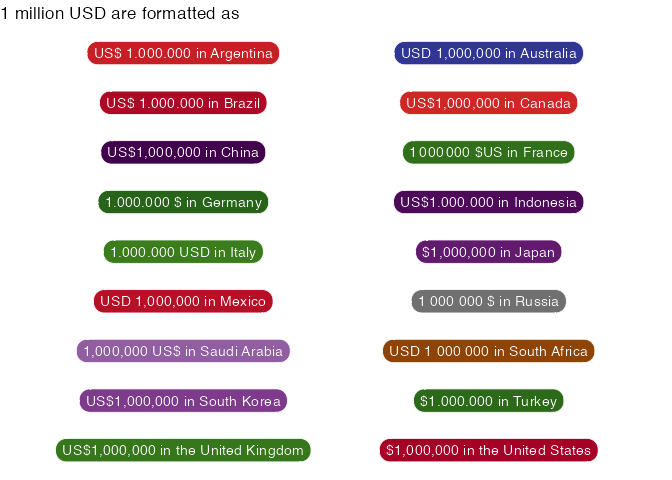
As another example, let’s look at formatting a chart according to
German style conventions, where a dot (.) is used as the
big mark.
base <- gapminder15 |>
  count(region, wt = pop) |>
  ggplot(
    aes(n, reorder(region, n),
      fill = region
    )
  ) +
  scale_fill_brewer(palette = "Dark2") +
  geom_col(width = .6) +
  theme_minimal() +
  labs(
    x = NULL, y = NULL,
    title = "Default"
  ) +
  guides(fill = "none")
With the countryscales package we can use the
scale_x/y_xxx_locale and label_xxx_locale
functions to add labels and format the axis of the base plot according
to German style conventions like this:
base +
  geom_label(
    aes(
      label = label_number_locale(
        locale = "de-DE", accuracy = 1000
      )(n)
    ),
    hjust = 1, fill = NA,
    label.size = NA, color = "white"
  ) +
  scale_x_number_locale(
    locale = "de-DE",
    expand = expansion(mult = c(0, .05))
  ) +
  labs(title = "German style conventions.")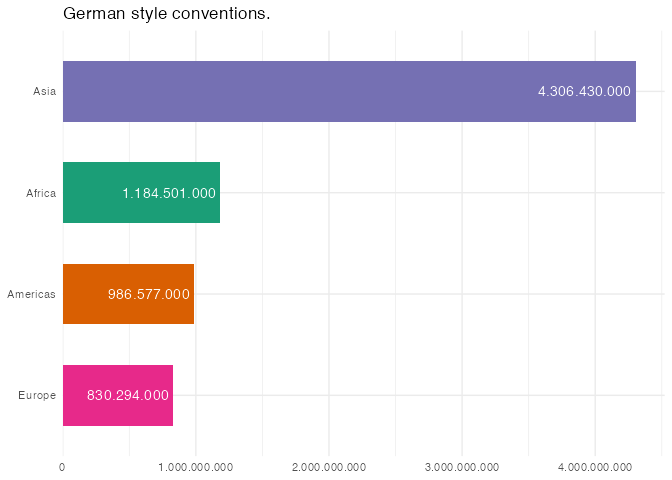
countryscales also ships ready-to-use functions for 27
countries — from Argentina to the United States — each with a
label_number_xx()/ scale_x_number_xx() family
pinned to that country’s own locale (see the full
list in the reference index). For instance, you can use
label_number_ch and scale_x_number_ch to
format the plot using Swiss style conventions:
base +
  geom_label(
    aes(
      label = label_number_ch(accuracy = 1000)(n)
    ),
    hjust = 1, fill = NA,
    label.size = NA, color = "white"
  ) +
  scale_x_number_ch(
    expand = expansion(mult = c(0, .05))
  ) +
  labs(title = "Swiss style conventions.")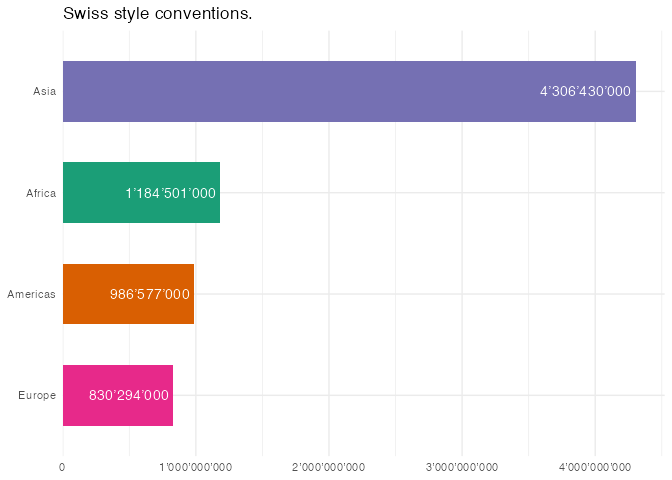
countryscales uses data on locale-specific numbering
formats from the Common Locale Data Repository (CLDR)
provided for easy use in R by the i18n
package. i18n lists 574 locales; countryscales
supports 552 of them directly, plus a further set of bare-language-code
aliases (e.g. "en", which resolves to a sensible default
regional variant), for 764 usable locale codes in total — run
show_locales() to list them all. Not supported are locales
which deviate from the international norm for grouping digits by threes.
This includes locales using the Indian
numbering system which
groups the rightmost three digits together (until the hundreds place), and thereafter groups by sets of two digits.
The label_xxx_locale family of functions are tested
against the output of Intl.NumberFormat
to ensure correctness for each supported locale. For example, to test
that label_currency_locale correctly formats numbers as
currencies in the German locale, the output is checked against the
output of the JS code
const number = 123456;

console.log(
  new Intl.NumberFormat('de-DE', { style: 'currency', currency: 'USD' }).format(
    number,
  ),
);countryscales would not be possible without the work by
other people:
Thanks to the people who contributed to the Common Locale Data Repository which provide all the data to support the world’s languages in software.
Thanks to Rich
Iannone for providing the CLDR data for easy use in R via the i18n
package. Additionally, the design of the hex logo for the
countryscales package was heavily inspired by the
i18n hex logo.
Thanks to Bob Rudis, who, similar in
spirit to what countryscales has in mind, provides
convenience functions scale_x/y_percent/number/dollar for
ggplot2 in the
hrbrthemes package,
which served as blueprints for the
scale_x/y_percent/number/currency_locale family of
functions.
Last but not least thanks to the authors of the scales package and the
people at Posit. When I started with
countryscales I thought that I simply had to provide some
wrappers around functions already provided by scales. But I quickly
realised that localization is a complex world on its own.
First, when it comes to formatting currencies, e.g. the correct
positioning of the currency symbol and the minus sign, I realised that
there are some cases which can’t be dealt with using
scales::label_number or
scales::label_currency. Hence, under the hood
countryscales uses a modified version of
label_number to format numbers as currencies.
Second, I learned that minus signs, percent signs, and so on,
include Unicode
control characters in several locales for bidirectional text
control. Unfortunately, scales::label_number does not allow
passing custom symbols for minus or plus symbols. Hence, under the hood
countryscales uses a modified version of
label_number to (mainly) account for Unicode control
characters.