

Classify occurrence records relative to country borders, without writing sf code.
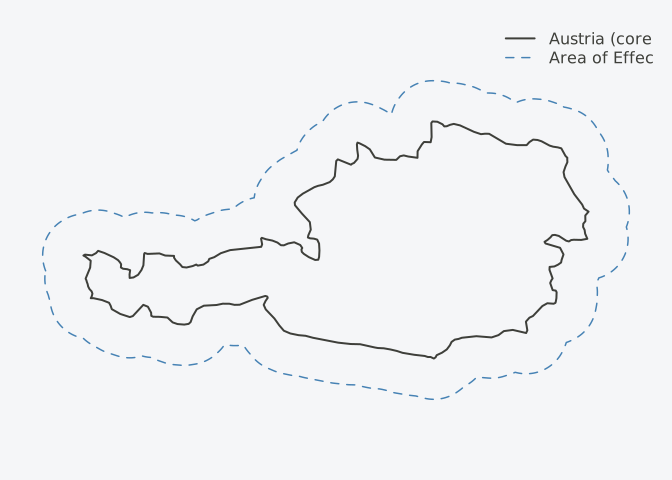
Ecological processes like dispersal are isotropic: a species spreads equally in all directions. Political borders are not. When you sample within a country, the border truncates the process, creating anisotropic artifacts near edges. The area of effect expands sampling outward to correct for this mismatch.
Dataframe in → dataframe out. No CRS headaches. No buffer distance guessing.
library(areaOfEffect)

# Your occurrence data
observations <- data.frame(
  species = c("A", "B", "C", "D"),
  lon = c(14.5, 15.2, 16.8, 20.0),
  lat = c(47.5, 48.1, 47.2, 48.5)
)

# One line - get back a classified dataframe
result <- aoe(observations, "Austria")
result$aoe_class
#> [1] "core" "core" "halo"
# (point D pruned - outside area of effect)Points are classified as core (inside the country), halo (outside but within the buffer), or pruned (too far out).
By default, the halo has equal area to the core. Why? Because buffer distance in meters is arbitrary and scale-dependent. A 10km buffer means something different for Luxembourg than for Brazil. Equal area gives a consistent correction factor across regions, and scales automatically without CRS expertise.
The package wraps sf boilerplate that’s easy to get wrong:
"Austria" or "AT", no need to find
shapefileslon/long/longitude/x,
etc.)# Install from GitHub
# install.packages("pak")
pak::pak("gcol33/areaOfEffect")library(areaOfEffect)
# Plain dataframe with coordinates
df <- data.frame(
id = 1:4,
longitude = c(14.5, 15.2, 16.8, 20.0),
latitude = c(47.5, 48.1, 47.2, 48.5)
)
# Classify relative to Austria
result <- aoe(df, "Austria")library(sf)
# sf points work too
pts_sf <- st_as_sf(df, coords = c("longitude", "latitude"), crs = 4326)
result <- aoe(pts_sf, "AT")# Austria + Germany
result <- aoe(df, c("AT", "DE"))
# Auto-detect countries from points
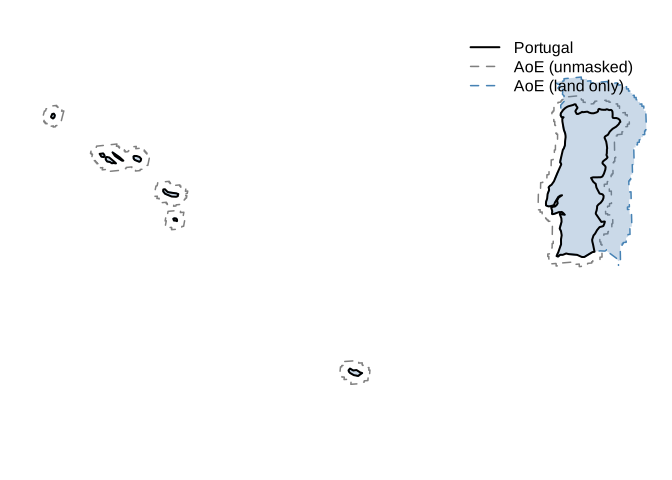
result <- aoe(df)For coastal countries, the buffer (scaled to equal area by default)
extends into the sea. If you’re working with terrestrial data, that’s
useless area. The mask parameter clips the halo to
land:
# Use the bundled Natural Earth land polygon
result <- aoe(df, "Portugal", mask = "land")

# Or bring your own mask
result <- aoe(df, "Portugal", mask = my_land_polygon)
The area parameter goes further: it finds the buffer
size that gives you the target halo area after clipping. So
area = 1 guarantees equal land area in core and halo, even
for countries like Japan where half the buffer would otherwise be
ocean.
# Equal land area, not equal total area
result <- aoe(df, "Japan", mask = "land", area = 1)The scale parameter controls halo size as a proportion
of core area.
Default: sqrt(2) - 1 ≈ 0.414, which gives equal
core and halo areas.
| Scale | Halo:Core Area |
|---|---|
sqrt(2) - 1 (default) |
1:1 |
1 |
3:1 |
0.5 |
1.25:1 |
“Software is like sex: it’s better when it’s free.” — Linus Torvalds
I’m a PhD student who builds R packages in my free time because I believe good tools should be free and open. I started these projects for my own work and figured others might find them useful too.
If this package saved you some time, buying me a coffee is a nice way to say thanks. It helps with my coffee addiction.
MIT
@software{areaOfEffect,
  author = {Colling, Gilles},
  title = {areaOfEffect: Area-Based Spatial Classification for Ecological Data},
  year = {2025},
  url = {https://github.com/gcol33/areaOfEffect}
}